After each wet or messy session
VacMaster limits how a chamber machine may be cleaned, and three of those limits are printed in the same words in both VP215 manual editions. The June 2024 VP215 user guide and the 2017 VP215 manual both carry 'DO NOT immerse in water or spray directly with liquid,' then 'If needed, use a clean, damp cloth with mild soap,' then 'DO NOT use any acetone-based or abrasive cleaners on the lid or other plastic parts.' Both name three wipe targets in the same fixed order — wipe the vacuum chamber clean, wipe the gasket clean, wipe the seal area clean. The section is not identical end to end, though. The 2017 version is headed 'Cleaning and Care' and its storage bullet reads 'Do not store the VP215 outside.'; the June 2024 version is headed 'VP215 Cleaning & Storage' and the same bullet reads 'DO NOT store the VP215 outside. 65° to 75° recommended.' Nor are those three sentences the only maintenance instruction VacMaster carried across untouched: the F1 reset, the seal-appearance rule, the cooling-time TIP and the warranty clause that excludes wear parts are each printed word for word in both documents, and each is quoted in its own section below.
The inside of the pouch is a further surface, and VacMaster names it in a different section from the three above. Its troubleshooting entry for a machine that does not pull a complete vacuum states that 'the seal bar, lid gasket and vacuum pouch need to be clean, dry and free of debris for the vacuum process to be successful,' and prescribes the remedy in the same breath: 'Wipe surface of the seal bar, lid gasket and the inside of the pouch and try again.' Set the two lists side by side and they do not match. The cleaning section names the chamber, the gasket and the seal area. The troubleshooting entry names the seal bar, the gasket and the pouch interior. Five named surfaces appear between the two lists and only the gasket is named in both, so an owner who follows the cleaning section alone never reads the instruction about the pouch. VacMaster's published remedy for debris at any of those surfaces is a wipe and a re-run, not a longer seal time. This page reproduces that instruction and makes no claim about what a contaminated bar does to a finished weld, because VacMaster publishes no such statement and Chamber Bench has never run a machine.
Minipack America assigns the looking rather than the cleaning, and puts a name against it: 'In order to have a good maintenance system for chamber vacuum sealers, assign a responsible person who checks every couple of weeks the following points.' That is the only frequency in this page's ledger attached to inspection rather than to replacing something, and Minipack states it in calendar weeks. Calendar weeks are not a unit VacMaster avoids: the June 2024 guide's own oil schedule opens 'First Change: one week after use.' What sets the Minipack instruction apart is therefore not its unit but what it schedules — a fixed cycle for looking at the machine, with a named person answerable for it, rather than a cycle for replacing a consumable. Among the points Minipack names is sound: 'How does your vacuum pump sound? Can you hear anything other than a humming noise – like a chattering, hissing, or rattling?' Chamber Bench reproduces that check as Minipack's published instruction. The site owns no chamber machine, runs no bench, and has never listened to a pump.
Can I wash the chamber of a vacuum sealer with water?
VacMaster prohibits it for its chamber machines. Both the 2017 VP215 manual and the June 2024 VP215 user guide state 'DO NOT immerse in water or spray directly with liquid' and permit only 'a clean, damp cloth with mild soap,' with no acetone-based or abrasive cleaner on the lid or other plastic parts. The prescribed order is chamber, then gasket, then seal area. A different brand's manual replaces that instruction entirely, so the document that shipped with the machine in front of you is the one that governs, not a category rule.
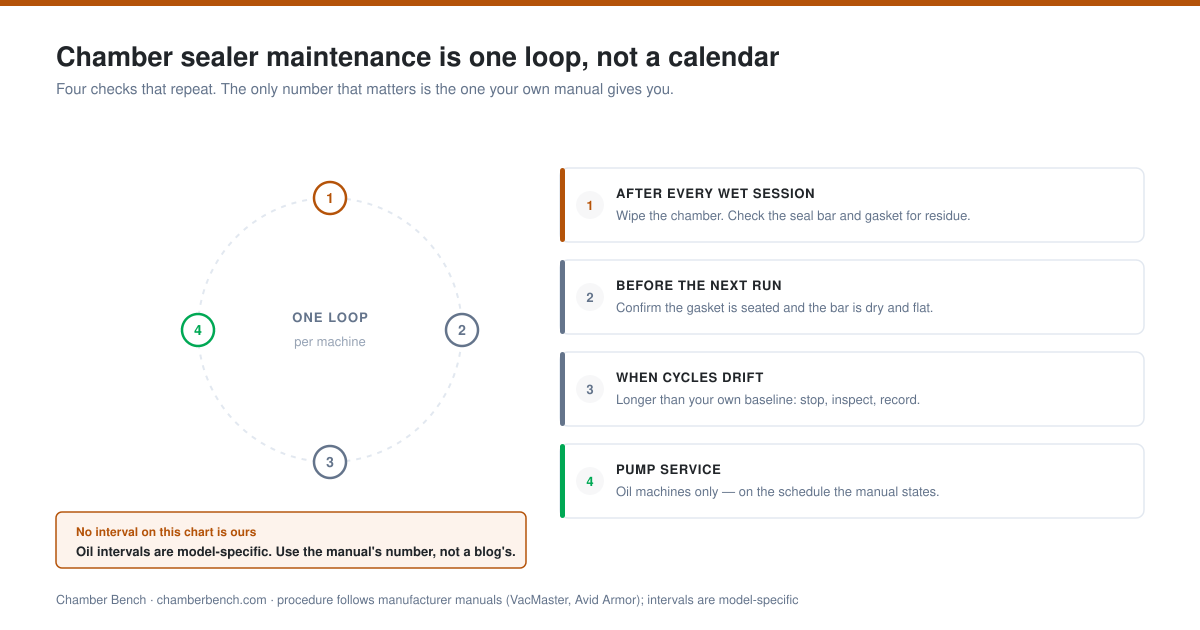
- Disconnect the machine or place it in the safe state its own manual prescribes before cleaning anything.
- Wipe the vacuum chamber, then the gasket, then the seal area — VacMaster's published order for the VP215, identical in the 2017 and June 2024 documents.
- Wipe the inside of the pouch as well: VacMaster names it in its troubleshooting entry as one of three surfaces that must be clean, dry and free of debris before a cycle will succeed, and it is absent from the cleaning list.
- Use a clean, damp cloth with mild soap only. VacMaster prohibits immersion, direct spraying, and acetone-based or abrasive cleaners on the lid and other plastic parts.
- Inspect the seal area for residue, wrinkles or damage before the next pouch, and record what you saw.
- Record a leak or a weak seal in the log instead of compensating blindly with more heat on the next cycle.
Source basis[1] VacMaster (ARY, Inc.): VP215 Chamber Vacuum Sealer User Guide (June 2024) · [2] VacMaster (ARY, Inc.): VP215 User's Manual (filename 2017) · [9] Minipack America
Use one log for condition and performance
One log with three unit columns — date, cycles and running hours — is the only structure that survives contact with the published record. VacMaster states an oil interval in months and cycles in its June 2024 VP215 user guide, in running hours in two Help Center articles, and as 'approximately 2 times a year depending on use' in a third Help Center article. Two of those four documents name the VP215 in their own text; the running-hours pair does not — one is addressed to 'my VacMaster chamber vacuum sealer' and the other, 'How to drain oil,' names no model anywhere. Minipack states an inspection interval in calendar weeks. A log that records only dates cannot answer a schedule written in cycles, and a log that records only cycles cannot answer one written in hours.
A baseline cycle with the same empty or standard load can reveal change, but it is not a diagnosis by itself. Voltage, temperature, pouch placement, leaks, pump condition, controls, and service needs can all affect behavior, and the log's job is to record which of them changed at the same time, not to name a cause.
Record the document, not just the action. VacMaster's shop site serves a June 2024 VP215 user guide, while VacMaster's Help Center page for the same model — itself bylined 28 April 2021 — links the text 'VP215 Manual' to an attachment listed as 'VP215 Manual 2017.pdf'. Those two documents part company in two different ways, and the difference matters when you write the log entry. On five points they give different answers to the same question: oil fill quantity, the recommended cooling time, the step-1 headspace figure, the seal-time increment for thicker pouches, and several part numbers. Headspace qualifies only at step 1: both manuals print the identical tips-page sentence 'Avoid overfilling the pouch. Leave a minimum of 3” of space between the contents and the open end of the pouch,' and it is the 2017 manual's own step 1, at 1” to 2”, that departs from it. On four more the June 2024 guide publishes something the 2017 manual does not carry at all — a duty cycle ('a maximum vacuum ON time of 70 seconds and a minimum OFF time of 10 seconds between cycles'), an operating temperature band ('Optimal operating temperature range is 65° to 75°'), a high-elevation note, and a specification table. Those four are absences in the older file, not contradictions between the two, and this page keeps the two categories apart rather than counting nine disagreements where there are five. 'Followed the manual' is therefore not a usable log entry. 'Followed the June 2024 guide, VP215 How to Use section' is.
Scroll horizontally to see every column.
| Date | Cycles since last entry | Running hours | Check | Observation | Source document |
|---|---|---|---|---|---|
| Example | 10 | — | Seal bar, gasket, chamber | No residue; gasket seated in its channel | June 2024 guide, Cleaning & Storage |
| Example | 250 | — | Pump oil | Cycle limit from the VP215 guide reached | June 2024 guide, VP215 How to Use |
| Example | — | 60 | Pump oil | Hours limit from the Help Center reached | Help Center article, 13 April 2020 (chamber machines generally) |
| Example | 5 | — | Cycle behavior | Longer than the same-load baseline | Stopped; support record opened |
| Example | — | — | Oil appearance | Color changed against the last entry | Two published descriptions disagree — see the oil grade section |
Source basis[1] VacMaster (ARY, Inc.): VP215 Chamber Vacuum Sealer User Guide (June 2024) · [2] VacMaster (ARY, Inc.): VP215 User's Manual (filename 2017) · [3] VacMaster Help Center: How often should I change the oil in my VacMaster chamber vacuum sealer? · [4] VacMaster Help Center: What is the difference between the VP210 and the VP215? · [5] VacMaster Help Center: How to drain oil · [9] Minipack America · [22] VacMaster Help Center: VP215 (model support page)
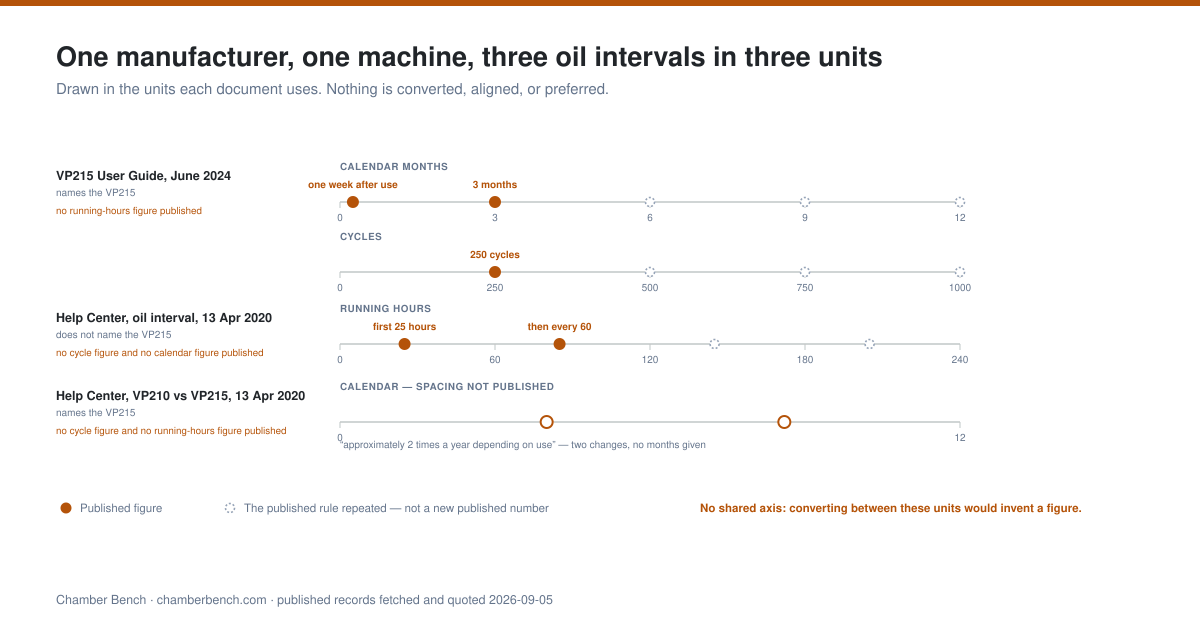
The VP215 oil-change interval: four published figures in three units
Four different oil-change intervals sit across the VacMaster documents an owner can reach for the VP215, and a fifth document publishes none. Two of the four name the machine in their own text; the other two are written for VacMaster chamber machines in general, and one of those names no model at all. The June 2024 user guide states: 'Required oil change schedule: First Change: one week after use. Future Change: every 3 months or 250 cycles, which ever comes first' — the split spelling of 'whichever' is in the original. The Help Center article 'How often should I change the oil in my VacMaster chamber vacuum sealer?', bylined 13 April 2020, states: 'The oil should be changed after the first 25 hours of use. After the initial oil change, the oil can be replaced after every 60 hours of use.' The VP210-versus-VP215 article, bylined the same day and naming the model outright, states: 'While the VP215 is more efficient and runs more smoothly and quietly, it requires oil changes approximately 2 times a year depending on use.' The 'How to drain oil' article, bylined 2 June 2016, repeats the 25 and 60 hour figures and adds a condition trigger: 'or if oil becomes discolored.' The distinction between a model-specific figure and a brand-wide one is not decorative: an owner reading the running-hours articles is reading guidance VacMaster did not attach to the VP215, and this page marks that in the table rather than flattening the four into one machine's schedule.
The 2017 VP215 manual publishes no interval at all. Its twenty pages contain an oil-filling procedure and a Cleaning and Care section, and no cycle count, no month figure and no running-hours figure anywhere in the document. That absence was checked against the document's own text rather than inferred, and it matters because the 2017 file is the one VacMaster's own Help Center still serves under the link text 'VP215 Manual'. The file also carries no date of its own. The string '2017' appears nowhere inside it; the PDF's internal title is 'VP215 Manual_v2016.indd' and its creation date is 13 December 2016. The year everyone calls it by comes from the attachment filename on VacMaster's Help Center, which is why the table above labels that column 'Date used to identify the document' rather than a date the publisher printed.
The three units cannot be converted into one another from anything VacMaster publishes. Months, cycles and running hours all need a cycle duration to reconcile, and no VacMaster document states how long a complete VP215 cycle runs. The June 2024 specification table prints 'Cycle Time: 20-40 Seconds' flat, with no statement of what that figure covers: whether it is the vacuum stage alone or a whole cycle including seal and cool-down is not published anywhere in the guide, and neither reading can be attributed to VacMaster. Any conversion built on that number would rest on an assumption the manufacturer has not made. This page presents three units as three units and converts nothing.
The condition triggers are the part every source agrees on in principle and splits on in detail. VacMaster's Help Center says to change the oil 'if it appears either dark brown or white and milky in color'; the drain article says 'or if oil becomes discolored'; Minipack escalates by degree, treating a slightly darker oil as a change and 'A dark brown or black oil' as a signal that 'you need to manually clean and flush the pump system.' No VacMaster document in this ledger prescribes a flush at any oil condition.
How often should I change the oil in a chamber vacuum sealer pump?
VacMaster publishes four oil intervals across the documents that cover the VP215, written in three units that cannot be converted into one another. The June 2024 VP215 user guide requires a first change one week after use and then 'every 3 months or 250 cycles, which ever comes first.' A Help Center article dated 13 April 2020, addressed to VacMaster chamber machines generally, gives 25 running hours and then every 60. A second article of the same date, which does name the VP215, says 'approximately 2 times a year depending on use.' The 'How to drain oil' article of 2 June 2016 repeats 25 and 60 hours, adds 'or if oil becomes discolored,' and names no model. The 2017 VP215 manual publishes no interval at all. Follow the document that shipped with your own machine, and record in the log which document you followed.
Do all chamber vacuum sealers need oil changes?
Dry-pump chamber machines have no oil to change; VacMaster's four conflicting VP215 oil intervals apply only to oil-pump models. Avid Armor states of its USV32: 'No! The USV32 has a dry piston pump, so no vacuum pump oil is needed for maintenance.' VacMaster describes its own VP210 as having 'a maintenance-free, 2-cylinder piston pump' and states that 'The VP210 does not require regular maintenance,' while the VP215 in that same article is the oil-pump machine carrying the changes. Pump architecture, not brand and not chamber size, decides whether an oil schedule exists for a given machine.
Scroll horizontally to see every column.
| Document | Date used to identify the document | Interval as published | Unit | Names the VP215 in its own text |
|---|---|---|---|---|
| VP215 Chamber Vacuum Sealer User Guide | June 2024, printed on the document | "First Change: one week after use. Future Change: every 3 months or 250 cycles, which ever comes first." | Calendar months and cycles | Yes |
| Help Center: How often should I change the oil in my VacMaster chamber vacuum sealer? | 13 April 2020, page byline | "changed after the first 25 hours of use... replaced after every 60 hours of use" | Running hours | No — addressed to VacMaster chamber machines generally |
| Help Center: What is the difference between the VP210 and the VP215? | 13 April 2020, page byline | "it requires oil changes approximately 2 times a year depending on use" | Calendar, per year | Yes |
| Help Center: How to drain oil | 2 June 2016, page byline | "After the first 25 hours of initial use... every 60 hours of use or if oil becomes discolored" | Running hours plus a condition | No — no model is named anywhere in the article |
| VP215 User's Manual | 2017 from the attachment filename; internal file name VP215 Manual_v2016.indd, PDF created 13 December 2016 | No interval published anywhere in the document | None | Yes |
Source basis[1] VacMaster (ARY, Inc.): VP215 Chamber Vacuum Sealer User Guide (June 2024) · [2] VacMaster (ARY, Inc.): VP215 User's Manual (filename 2017) · [3] VacMaster Help Center: How often should I change the oil in my VacMaster chamber vacuum sealer? · [4] VacMaster Help Center: What is the difference between the VP210 and the VP215? · [5] VacMaster Help Center: How to drain oil · [9] Minipack America · [17] Avid Armor Help Center: USV32 how-to and FAQs index
Four fill quantities, four tool specifications, and one o-ring
VacMaster publishes four oil fill quantities for the VP215, two of them inside the same document. The June 2024 user guide's front section states: 'Fill the pump until the oil level is at 1/2 to 3/4 in the site glass. This is approximately 9 to 9 1/2 ounces of oil.' The How To section of that same guide states: 'Fill the pump until the oil level is at 1/2 to 3/4 in the site glass. This is approximately 10 to 12 ounces of oil.' The 2017 manual gives the identical sight-glass instruction and 'approximately 3 - 3½ ounces of oil.' The Help Center states 'Use 3 ounces of oil for the VP215,' and VacMaster's step-by-step oil-change article states 'The machine will hold approximately 3 ounces of oil.'
The sight-glass level is the figure that moves least, but it does not hold across all five documents either, and the exact split is worth stating rather than rounding. Three of the five give the same physical target: 'at 1/2 to 3/4 in the site glass' in each of the June 2024 guide's two procedures, and 'at ½ to ¾ in the site glass' in the 2017 manual. A fourth, VacMaster's step-by-step oil-change article, names a different level on the same glass: 'Stop adding oil when the oil level is slightly more than half way up the window glass.' The fifth, the Help Center article 'How much oil is required for the VP215?' dated 8 April 2022, gives no glass instruction at all — its published answer is the single sentence 'Use 3 ounces of oil for the VP215.' So the tally is three documents on one glass target, one on a different glass target, and one silent on the glass, against an ounce figure that ranges from three to twelve across the same five files. The 2017 manual is the strongest evidence that the ounce figures changed while the physical target did not, because it pairs the newer manual's exact sight-glass wording with a quantity roughly a third of the newer manual's lower figure. 'Site glass' is VacMaster's own spelling in both manuals and is reproduced here as printed; the oil-change article calls the same component the 'window glass'.
One document names the same fill fitting two ways and prescribes two different tools for it, and a second, sharper disagreement sits on the fitting underneath. On the fill side there are three published specifications. The June 2024 guide's front section says 'Remove the Oil Fill Cap: Locate the oil fill cap on the vacuum pump and unscrew it,' with no wrench anywhere in its required-supplies list. The How To section of the same guide says 'Remove the Oil Fill Bolt: Locate the oil fill bolt on the vacuum pump and remove it using an adjustable wrench or similar tool,' and adds 'Adjustable wrench (not included)' to its supplies. VacMaster's Help Center oil-change article gives that fitting a third name and a size, at its step 7: 'Using the same 14 mm wrench, loosen and remove the oil fill plug and set it aside.' Cap, bolt and plug; bare fingers, an adjustable wrench and a 14 mm wrench, for one hole on one pump. The drain fitting below it carries a two-document conflict of its own. The same oil-change article says at step 5, 'Using a 14 mm wrench, carefully loosen and remove the drain plug and drain the oil.' The general 'How to drain oil' article lists 'Wrench with 7/8” socket (not included)' in its required supplies and instructs at step 4, 'Remove the oil drain bolt using your 7/8” socket wrench' — and 7/8 of an inch is roughly 22.2 mm, against the 14 mm the VP215-specific article gives for the same job. That article names no model anywhere, so it may be addressed to VacMaster's larger machines rather than the VP215, and VacMaster publishes nothing that says which models it covers; this page records it as a published specification without assuming which machine it fits. Four published tool specifications across two oil-service fittings, and the only metric size on either of them comes from the one article written for this machine by name.
VacMaster names one cause for nearly every leak, and it is created during the change itself. The oil-change article instructs: 'Replace the plug, tightening first by hand, then with the 14 mm wrench to tighten just until snug.' It then states: 'Do not over-tighten as it will cause the rubber o-ring to break leading to oil leaks. This is the cause of almost all oil leaks reported on the VP215.' An earlier step warns: 'Use caution not to lose the rubber o-ring on the drain plug as it helps prevent oil leakage.' No VacMaster document publishes a torque figure for that plug; 'just until snug' is the entire specification, and there is no number for this page to cite.
Two procedural details sit in the Help Center and only partly in the manuals. The drain article says 'Prepare oil in the pump by running the vacuum process a few times. This will warm up the oil, allowing it to drain freely and remove any contaminants.' The June 2024 guide carries the same idea only in its second oil procedure — 'Run vacuum process a couple of times to "warm up" the oil' — and not in its front-section procedure, and the 2017 manual omits it entirely. The oil-change article also states 'This simple process takes no more than ten minutes to complete' while requiring the machine to be propped on wood blocks it describes two ways: 'Using two wood blocks that are three to five inches tall, prop your machine up on each side, going front to back, not side to side,' against an equipment list calling the same blocks '(20" x 5")'. One article, two descriptions of its own blocks.
How much oil does a VacMaster VP215 pump hold?
VacMaster publishes four different answers, two of them in the same document. The June 2024 VP215 user guide states 'approximately 9 to 9 1/2 ounces of oil' in its front section and 'approximately 10 to 12 ounces of oil' in its How To section. The 2017 VP215 manual states 'approximately 3 - 3½ ounces of oil.' The Help Center states 'Use 3 ounces of oil for the VP215.' Three of the five documents give the same physical target, fill to between one half and three quarters of the sight glass; the step-by-step oil-change article instead says 'slightly more than half way up the window glass'; and the 8 April 2022 Help Center article mentions no glass at all. Confirm the quantity with VacMaster before topping up rather than following whichever figure you read first.
How do you dispose of used vacuum pump oil?
VacMaster publishes a disposal requirement and pushes the substance of it onto local law without naming a route. Its VP215 oil-change article states: 'Be sure to dispose of used oil in a manner that is safe for the environment and that complies with all local, state and federal laws.' Its drain article words it differently: 'Dispose of old oil properly, according to your local and state regulations.' Neither names a collection point, a container, or a waste category, and neither the 2017 manual nor the June 2024 manual mentions disposal anywhere. That is a documented gap in the manufacturer's record rather than guidance this page can supply on its behalf.
Scroll horizontally to see every column.
| Document | Date | Quantity as published | Sight-glass instruction in the same document |
|---|---|---|---|
| VP215 User Guide, front section | June 2024 | "approximately 9 to 9 1/2 ounces of oil" | "at 1/2 to 3/4 in the site glass" |
| VP215 User Guide, How to Use section | June 2024 | "approximately 10 to 12 ounces of oil" | "at 1/2 to 3/4 in the site glass" |
| VP215 User's Manual | 2017 (filename) | "approximately 3 - 3½ ounces of oil" | "at ½ to ¾ in the site glass" |
| Help Center: How much oil is required for the VP215? | 8 April 2022 | "Use 3 ounces of oil for the VP215." | Not stated — the article publishes no glass instruction at all |
| Help Center: How to change the oil on your VP215 | 2 June 2016 | "approximately 3 ounces of oil" | "slightly more than half way up the window glass" |
Source basis[1] VacMaster (ARY, Inc.): VP215 Chamber Vacuum Sealer User Guide (June 2024) · [2] VacMaster (ARY, Inc.): VP215 User's Manual (filename 2017) · [5] VacMaster Help Center: How to drain oil · [6] VacMaster Help Center: How much oil is required for the VP215 chamber vacuum sealer? · [7] VacMaster Help Center: How to change the oil on your VP215
Oil grade, oil color, and what 'food grade' names on the label
VacMaster specifies its chamber oil two incompatible ways. A Help Center article dated 13 April 2020 states 'VacMaster chamber machines use 10W non-detergent, hydraulic oil.' VacMaster's current catalog sells oil for the same machines by ISO grade instead: 'VacMaster ISO 68 General Purpose chamber vacuum sealer oil is designed for vacuum packaging equipment operating in normal temperature environments including home and professional kitchens, and refrigerated rooms,' rated on that page for 'temperatures 25 F to 80 F' and bulleted 'Works with all VacMaster Chamber Sealer Oil Pumps.' A second product, ISO 100 Extreme Heat, is 'Designed for temperatures 60 F to 150 F (extreme heat).' A third, ISO 32 Extreme Cold, part 980102, is 'Designed for temperatures -40 F to 32 F (extreme cold)' and carries the same 'Works with all VacMaster Chamber Sealer Oil Pumps' and '100% Synthetic USDA H1 Oil' bullets as the other two. Three ISO grades, three temperature bands, one compatibility claim covering all VacMaster oil pumps — and no source publishes a conversion between the 10W designation and any ISO grade, so the Help Center's specification and the catalog's cannot be reconciled from published material.
VEVOR answers the same question on a customer thread, and the thread carries two brand replies that do not name the same grades. Its DZ-260C product Q&A shows the customer question 'What iso oil does the 260C use, and can it use synthetic oil?' with three replies beneath it. One is from another customer: 'i am looking for the right oil too. what did you go with?' — By AARON on Aug 18, 2023. The second reads '46, 68 and 100 oils can all be used.' — By vevor on Aug 18, 2023. The third reads 'You need to buy 46 or 68 vacuum oil.' — By vevor on Aug 09, 2023. Both of the brand-attributed replies answer grade, neither answers quantity or interval, and the two name different sets: 46, 68 and 100 in one, 46 or 68 in the other. Neither reply says whether synthetic oil is acceptable, which was the second half of the question asked. A separate string, 'What type and amount of oil does the vacuum pump require, and how often should it be changed?', also appears on that page, but it is one of three suggested prompts inside VEVOR's 'Ask about this product by AI' widget rather than a question a customer posted, and nothing on the page answers it. VEVOR's D260C support page routes 'Oil changing and draining methods for the D260C chamber sealing machine' to a maintenance video and publishes no interval, quantity or torque figure in text anywhere on the page. This page did not transcribe those videos, so it records only that the text figures are absent.
Two manufacturers describe clean pump oil as opposites. VacMaster states 'VacMaster machine oil should be translucent.' Minipack America states 'Clean oil is nearly opaque and is similar in appearance to vegetable oil. A slightly darker oil means you should do an oil change. A dark brown or black oil means you need to manually clean and flush the pump system.' Both are manufacturer statements about chamber pump oil, and they cannot both describe the same appearance. Where the two agree is on darkening as a trigger; where they part is on the baseline and on whether a dark result calls for a change or a flush.
Moisture is the wet-food owner's oil problem, and one manufacturer publishes a temperature for it. Minipack states: 'If your vacuum sealer model has an oil conditioning program, run this at least once a month. It brings the vacuum pump to maximum operating temperature. This will heat the oil above 212°F and boil off the moisture that accumulated in the pump.' VacMaster makes a related point without any figure, writing in its VP210-versus-VP215 article that 'With moisture, the oil pump will catch containment's and during the changing of the oil they will be flushed out' — the misspelling is in the original.
VacMaster labels all three of its chamber oils '100% Synthetic USDA H1 Oil', and NSF International states that the body named on that label left the scheme in 1998: 'There is a misconception that lubricants are registered through the U.S. Department of Agriculture (USDA). This is not true. The USDA discontinued its registration program in 1998.' NSF's own category table defines the designation as 'Lubricants | H1 | General – incidental contact', against 'H2 | General – no contact'. NSF states the regulatory basis — 'the product must be formulated in accordance with the U.S. FDA's Code of Federal Regulations Title 21 Section 178.3570 (21 CFR)' — and the limit behind it: 'There is a 10 parts per million (ppm) limit for lubricant base oils (e.g. mineral oil) that can be present in food if incidental contact should occur.' NSF also names where a registration is verified: 'food and beverage processors around the world reference a registration program's listing like the NSF White Book.' Whether any particular VacMaster oil appears in that listing was not checked for this page and is not claimed either way. Both statements are reported; neither is adjudicated. The full food-grade question — what the H1 category covers, what a listing proves, and which product descriptions overstate it — is carried on /chamber-vacuum-sealer-pump-oil/ rather than repeated here.
What kind of oil goes in a chamber vacuum sealer pump?
VacMaster states that its chamber machines take '10W non-detergent, hydraulic oil' in a Help Center article dated 13 April 2020, while VacMaster's current catalog sells oil for those same machines under ISO grades — ISO 68 General Purpose rated for 25 F to 80 F, ISO 100 Extreme Heat rated for 60 F to 150 F, and ISO 32 Extreme Cold rated for -40 F to 32 F — with no published conversion between the two systems. On VEVOR's DZ-260C product page, two brand-attributed replies to one customer question about ISO oil name different sets: '46, 68 and 100 oils can all be used' and 'You need to buy 46 or 68 vacuum oil.' Grade statements are brand-specific and do not transfer between pumps, so read the document that shipped with the machine, and treat a 'USDA H1' label as a claim to check against NSF's category definition rather than a certification to assume.
Source basis[4] VacMaster Help Center: What is the difference between the VP210 and the VP215? · [8] VacMaster Help Center: What color should the oil be? · [9] Minipack America · [10] VacMaster Help Center: What type of oil is used in chamber vacuum sealers? · [11] VacMaster: VacMaster ISO 68 General Purpose Vacuum Sealer Oil, Quart Size (part 980104) · [12] VacMaster: VacMaster ISO 100 Extreme Heat Vacuum Sealer Oil · [13] NSF International: NSF Nonfood Compounds Registration Program: Quick Reference Guide to Categories, Table II · [14] NSF International: How Registrations Prove Lubricants Are Food Grade · [15] VEVOR: VEVOR Vacuum Packaging Machine – 1700W Chamber Sealer (DZ-260C) product Q&A · [16] VEVOR: Product Support (DZ-260ZKBZJ400W01V2) · [28] VacMaster: VacMaster ISO 32 Extreme Cold Vacuum Sealer Oil (part 980102)
Troubleshoot with the manufacturer's own remedies, not a forum
Every remedy in this section is VacMaster's, published in its June 2024 VP215 user guide, its 2017 VP215 manual, or its Help Center, and it applies to those machines. Chamber Bench has tested none of them; they are reproduced because the manufacturer's document is the authority on its own machine. Both manuals sort the subject into the same four symptom groups — 'VP215 will not turn on', 'VP215 does not pull a complete vacuum with pouch', 'Vacuum pouch loses vacuum after being sealed' and 'VP215 is not sealing pouch properly' — and this page treats those four as VacMaster's own taxonomy for the VP215, not as an account of how chamber machines fail in general. No source in this page's ledger publishes failure-frequency data for any brand, so nothing here claims which faults are common. Where your machine is a different model, the equivalent section of its own manual replaces this one entirely.
The manuals and the Help Center disagree about what belongs in the no-power checklist, and the gap is the useful part. VacMaster's Help Center states: 'Are you not getting lights or any power on your VP210 or VP215? Fortunately, this can be resolved in most instances by replacing the fuse in your machine.' It names the part — a 15 amp fuse, VacMaster part #979209 — and the location: 'The fuse holder is located directly under the power cord receptacle. There is a drawing of a fuse on the cover.' On substitutes it states: 'If you need to purchase additional fuses, you can use any 15 amp fuse as long as it is the same size as the one you remove however, Vacmaster® recommends purchasing stock fuses.' Neither the 2017 manual nor the June 2024 manual mentions the fuse in its 'VP215 will not turn on' entry — both lists were read in full to confirm the absence, and both contain the same four items: outlet, power cord, power switch, and the F1 reset — even though the June 2024 manual ships '15-AMP Fuses (2x)' in the maintenance kit and adds that 'NSF models will have a fuse on the seal transformer', a second fuse location the Help Center article does not cover.
The F1 remedy has been stable for at least seven years. Both manuals print it word for word: 'If you see "F1" displayed on the LED screen and the machine will not function, make sure the lid is open and turn the power off. Turn the machine back on and it should return to working order.' A second code carries two labels, and both of them are inside one document rather than split across editions. The June 2024 guide prints the caption 'Lid Release — Indicates the end of the process' under the last of its four LED-screen illustrations, and at step 5 of 'Sealing with a Chamber Pouch' the same guide states 'ED Code - stands for end of demonstration. You are ready for a new cycle.' Both appear in the June 2024 file. The 2017 manual prints the identical 'Lid Release / Indicates the end of the process' caption and carries no 'end of demonstration' expansion anywhere in its text. What the screen in the 2017 illustration actually displays could not be confirmed: those characters sit inside the image and not in the document's text layer, so this page does not quote them. Two labels for one code, published together, and VacMaster reconciles them nowhere.
Altitude has two published treatments, and they answer different questions. The June 2024 manual, which prints the note twice in separate sections, says: 'High elevation may cause the gauge to not go all the way into the green. You may have to increase the vacuum time by 5-10 seconds in higher elevation.' The white paper VacMaster itself publishes on the subject, written by Ohio Medical Corporation, states a ceiling rather than a remedy: 'As a general "Rule of Thumb", for every 1000 feet above sea level, the maximum possible vacuum is reduced by approximately one in-Hg (0.491 psi).' Its worked table gives Los Angeles at 0 ft with 14.69 psia and 29.92 in-Hg, and Denver at 5,280 ft with 12.12 psia and 24.68 in-Hg; its worked example carries a pump rating forward: 'The 80.2% rating applied to the maximum possible vacuum (24.68 in-Hg) results in a maximum vacuum of 19.79 in-Hg for this pump in Denver.' Throughout this passage 'vacuum' names the pressure condition inside the chamber, not the appliance. The 2017 manual carries no altitude note at all.
Headspace is where the older manual contradicts itself, and the newer one prints a step-1 figure that matches its own tips page. Both manuals print the same tips-page sentence: 'Avoid overfilling the pouch. Leave a minimum of 3” of space between the contents and the open end of the pouch. This is called head space. This will prevent spills during the vacuum sealing process.' It stands word for word in the 2017 file and in the June 2024 guide. But the 2017 manual's own step 1 for using the machine gives a different figure for the same measurement: 'Allow 1” to 2” of extra headspace at the top of the pouch to ensure a quality, air-tight seal.' One to two inches in the procedure against a three-inch minimum on the tips page, inside one twenty-page document, with nothing published to reconcile them. The June 2024 guide prints 'Allow 3” of extra headspace at the top of the pouch' at that same step, which brings its procedure into line with the tips page it inherited, and its Vacuum Packaging Guidelines page states the figure a third time in a third wording: 'Avoid overfilling the pouch. Leave 3” minimum of space between the contents and the open end of the pouch.' So the accurate account is not that headspace changed between editions. The three-inch minimum is in both files; the step-1 figure is the part that changed; and the 2017 manual was already at odds with itself before the newer guide was written. Headspace is a seal-contamination control rather than a specification, which is why it belongs here. Separately, and for a different symptom, the June 2024 manual says 'If you notice that the product is not vacuum packaged tightly, then increase the vacuum time by 5 seconds, vacuum and seal again' — a five-second step for a loose package, distinct from the five-to-ten-second step for elevation. The manual keeps the two apart and so does this page.
Why won't my chamber vacuum sealer turn on?
VacMaster's June 2024 VP215 guide carries a troubleshooting entry for a machine that will not turn on and treats an 'F1' code shown on the LED screen as part of that same entry, with the remedy 'make sure the lid is open and turn the power off. Turn the machine back on and it should return to working order.' VacMaster's Help Center adds a step both manuals leave out of that entry: 'this can be resolved in most instances by replacing the fuse in your machine' — a 15 amp fuse, part #979209, in a holder 'directly under the power cord receptacle.' Work the checks in the document for your own model rather than a general checklist, and escalate a code that persists, because an F1 is a condition the machine is reporting and not a setting an owner adjusts.
Why is my chamber vacuum sealer not pulling a full vacuum?
Check elevation before suspecting the pump. VacMaster's June 2024 VP215 guide states that at high elevation the gauge may not go all the way into the green, and that vacuum time may need to be increased by 5 to 10 seconds. The white paper VacMaster publishes on altitude puts a ceiling on the same problem: 'for every 1000 feet above sea level, the maximum possible vacuum is reduced by approximately one in-Hg,' with Denver at 5,280 ft carrying 24.68 in-Hg of atmospheric pressure against 29.92 at sea level. VacMaster also names three surfaces that stop a cycle succeeding at all: 'The seal bar, lid gasket and vacuum pouch need to be clean, dry and free of debris.' That same guide keeps an incomplete vacuum during the cycle separate from a package that loses vacuum after sealing, because the two symptoms point at different parts of the machine.
Why does my vacuum-sealed bag go soft a day later?
A pouch that loses vacuum after sealing is a distinct fault from one that never pulled down, and VacMaster's June 2024 VP215 guide lists them as separate troubleshooting entries with different causes. For the pouch that goes soft afterwards it names two: 'Sharp items can poke small holes in pouches' and 'Some fruits and vegetables can release gases (out gassing) if not properly blanched or frozen before packaging.' A package that leaves the chamber tight and is loose the next morning points at the film or the seal rather than at the pump, so inspect the full width of the cooled seal and check whether food or moisture was caught in it. Note that the 2017 manual's version of this entry permitted covering sharp edges 'with a paper towel or VacMaster® Bone Guard', while the June 2024 edition drops the paper towel and leaves only the branded accessory.
Why is my chamber vacuum sealer not sealing properly?
VacMaster's June 2024 VP215 guide answers this with a seal-appearance rule that adjusts in both directions: 'If the seal is spotty or incomplete, increase the seal time by 0.1 second. If the seal appears white or milky, decrease the seal time by 0.1 second,' preceded by the baseline 'A positive seal will appear clear upon inspection.' The identical wording appears in the 2017 manual. Move one tenth of a second at a time and judge the seal only after it has cooled, because the rule keys on the appearance of the finished weld rather than on the number on the timer. Before adjusting anything, VacMaster requires the seal bar, the lid gasket and the inside of the pouch to be clean, dry and free of debris.
Source basis[1] VacMaster (ARY, Inc.): VP215 Chamber Vacuum Sealer User Guide (June 2024) · [2] VacMaster (ARY, Inc.): VP215 User's Manual (filename 2017) · [21] VacMaster Help Center: How to change the fuse in the VP210 and VP215 · [27] Ohio Medical Corporation, published by VacMaster Help Center
Wear parts: two repair models, and no published lifespan for any of them
The only seal-bar lifespan lever VacMaster publishes is a timing rule, and its own recommended settings do not obey it. Both manuals state: 'TIP: To prolong the life of your seal bar, set the cooling time to twice the sealing time.' The June 2024 manual's recommended starting settings are 'Vacuum Time - 40 seconds / Sealing Time - 1.2 seconds / Cooling Time - 2.2 seconds'. The 2017 manual carries the same tip with 'Cooling Time - 2 seconds'. A VacMaster Help Center chart lists the VP215 row as '20-40 sec | 1.2 | 2.0' under the columns Model, Cycle Time, Seal Time and Cool Down Time — which is the 2017 manual's figure restated in decimal form, not a third one. Counted honestly, VacMaster publishes two cooling values across three documents: 2.2 seconds in the June 2024 guide, and 2 or 2.0 seconds in the 2017 manual and in the chart. The figure the TIP itself implies, twice 1.2, is 2.4, and 2.4 appears in no VacMaster document at all — it is this page's arithmetic on VacMaster's own rule, given as arithmetic and never as a published specification. Two published values, one derived one, and no publisher's reconciliation between the rule and the settings printed a few pages from it. One further problem sits on the chart: its figures exist only inside a JPG image, so a screen reader or a text-only crawler retrieves nothing at all from that page.
The seal-time increment for a thicker pouch doubled between editions. The 2017 manual: 'Note: For thicker pouches, you should increase the seal time in 0.1 second increments until the pouch seals completely.' The June 2024 manual: 'NOTE: For thicker pouches, increase the seal time in 0.2 second increments until the pouch seals completely.' Both manuals also state, on the same page as that note, 'It is recommended that you make adjustments in 0.1 second increments to avoid melting the pouch,' so only the newer edition contradicts itself within one page.
The two brands in this ledger replace different objects for the same symptom. VacMaster replaces the consumables inside the bar. Its June 2024 maintenance-kit list defines 'Seal Wire: Used to replace seal wire that spans the length of the seal bar; should be replaced if the wire shows heavy discoloration' and 'Seal Tape: Used to replace seal tape the covers the seal wires; should be replaced if the tape shows heavy discoloration, is torn, or is starting to lose the adhesive' — the printed typo is VacMaster's. It ships the tool for the job and states what it is for: 'Hex/Allen Wrench: Used to remove tension blocks that hold the seal wire to the base of the seal bar.' Avid Armor replaces the assembly: 'If the seal bar has developed wrinkles or hot spots on the teflon tape, it will need to be replaced,' with a two-step published procedure — 'Remove existing seal bar by pulling it off of pistons underneath' then 'Place on new seal bar, aligning connection points to pistons' — and no tools named at all. Neither model is presented here as the better one; they are two published answers to one symptom.
One material carries three names across these documents. VacMaster calls it 'Seal Tape' in the maintenance kit and 'Teflon tape' in the warranty exclusion; Avid Armor calls it 'teflon tape' in its seal-bar article and 'seal Teflon tape' in its warranty. PTFE is the material behind all three names. VacMaster also publishes an instruction aimed at one specific mistake with it: 'Be sure to leave that tape strip on (we call it seal tape), that will protect the bags from melting on to the seal bar.' That article exists because VacMaster chose to answer the question 'I just received a replacement seal bar. Should I remove the tape?' Why an owner would ask it is not something the article says, and not something this page will supply on VacMaster's behalf.
Avid Armor publishes the gasket triggers and the fitting sequence in one place: 'If your lid gasket has become worn, compressed or distorted, it will need to be replaced to ensure your sealer can pull a vacuum.' Its four published steps are '1. Start at one corner and pull gasket upwards to remove from gasket channel. 2. Take new gasket and start at one corner, pressing flat side of gasket in channel. 3. Ensure fin of gasket is facing outwards. 4. Work your way around chamber without compressing gasket.' Steps 3 and 4 are instructions with no published reason attached: Avid Armor does not state why the fin must face outwards, or what compressing the gasket during fitting would do afterwards. Both gaps are left open here rather than filled with a mechanism no manufacturer has written down.
Ordering from the wrong manual orders the wrong part, though not for every part, and the two files diverge in two distinct ways on top of the numbers they simply share. Several are identical in both, the seal pad holder included: lid gasket 979425, seal bar assembly 979200, 15A fuse 979209, microswitch 979255, and 979225, which the June 2024 tables call 'Top bar, seal pad holder' and the 2017 tables call 'Holder for Seal Pad'. Some pairs genuinely changed number for the same item: seal pad 979227 in June 2024 against 979226 '(Brown)' in 2017, pump/motor 979214 against vacuum pump 979215, and lid latch assembly 979172 against lid latch 979170. Others are present in one file only, which is an addition or a deletion rather than a change: the June 2024 lid-assembly table alone lists tape for the top bar 979825 and a lid gasket sold by length, 978263, listed as '6 ft', neither of which has any counterpart in the 2017 tables; the 2017 manual alone lists 'Seal Tape (Tape Only) 979410'. Both files are reachable on VacMaster properties today, and VacMaster publishes no reconciliation between the two lists, so an owner cannot tell from either document which numbers were superseded, which were only renamed, and which were added after the older file was set.
No source found for this page publishes how long any of these parts lasts. Every trigger is a condition: heavy discoloration, wrinkles, hot spots, tearing, loss of adhesive, a gasket worn, compressed or distorted. Not one document gives a cycle count or a calendar figure for a seal wire, a strip of PTFE tape, or a lid gasket. That absence is the finding, and it is why a log that records the observed condition at each inspection is the only replacement schedule the published record actually supports.
When do you replace the seal wire and the PTFE tape on a chamber sealer?
VacMaster publishes condition triggers rather than intervals. Its June 2024 VP215 maintenance-kit list states that the seal wire 'should be replaced if the wire shows heavy discoloration' and that the seal tape 'should be replaced if the tape shows heavy discoloration, is torn, or is starting to lose the adhesive.' Avid Armor replaces a different object for the same symptom, stating that a seal bar 'that has developed wrinkles or hot spots on the teflon tape' needs replacing as a complete unit. No manufacturer in this page's ledger publishes a cycle count or a calendar life for a seal wire, a seal tape or a lid gasket, so the inspected condition is the only published basis for the decision.
Scroll horizontally to see every column.
| Machine | What the maker replaces | Published trigger | What ships with the machine |
|---|---|---|---|
| VacMaster VP215 | Seal wire and seal tape, separately | Wire: "heavy discoloration." Tape: "heavy discoloration, is torn, or is starting to lose the adhesive" | Maintenance kit: double-sided tape, 15-amp fuses (2x), seal wire, seal tape, oil fill bottle/oil, hex/Allen wrench, reversible screwdriver |
| Avid Armor USV32 | The complete seal bar | "wrinkles or hot spots on the teflon tape" | Replacement vacuum chamber gasket and seal bar in the box, plus filler plate, accessory hose and adaptor, 30 pouch samples |
| VEVOR D260C | Heating wire and sealing strip, as separate procedures | No text trigger published | Not published in text; the support page routes each procedure to a repair video |
Source basis[1] VacMaster (ARY, Inc.): VP215 Chamber Vacuum Sealer User Guide (June 2024) · [2] VacMaster (ARY, Inc.): VP215 User's Manual (filename 2017) · [16] VEVOR: Product Support (DZ-260ZKBZJ400W01V2) · [17] Avid Armor Help Center: USV32 how-to and FAQs index · [18] Avid Armor Help Center: How do I replace the seal bar on my USV32? · [19] Avid Armor Help Center: How do I replace the lid gaskets on my USV32? · [20] Avid Armor · [22] VacMaster Help Center: VP215 (model support page) · [23] VacMaster Help Center: I just received a replacement seal bar. Should I remove the tape? · [26] VacMaster Help Center: What are the vacuum, sealing, and cooling off times for chamber vacuum sealers? (chart image)
Repair or replace: what the warranties exclude and who may open the machine
Both brands exclude the same class of parts from warranty in near-identical language, and those are exactly the parts that wear. VacMaster's VP215 limited warranty is void 'to any components of the Goods, including, without limitation, Teflon tape, lid gaskets and seal wire,' a clause printed word for word in both the 2017 and the June 2024 manuals, so the exclusion has been stable across both documents. Avid Armor states: 'Components including seal Teflon tape, sealing wire, gaskets, seal bars, or any parts tampered or altered are NOT covered under the one year warranty,' directly beneath a guarantee that its sealers 'will be free from defects in material and workmanship for one year following the purchase date.' Two brands, two pump architectures, the same exclusion: consumables are the owner's responsibility on both.
The repair boundary is drawn by the manufacturer, not by the owner's confidence. VacMaster's warranty is void 'to repairs made by anyone other than ARY, Inc. without prior authorization from ARY, Inc.' Safeguard 11 of the June 2024 manual states 'Do not disassemble this appliance beyond instructions provided. Doing so may result in personal injury.' Safeguard 7 removes one job from the owner outright: 'Supply cord replacement and repairs must be conducted by the manufacturer, its service agent, or similarly qualified persons in order to avoid a hazard,' and the same item warns against operating 'any appliance with a damaged supply cord or plug, or after the appliance malfunctions or has been dropped or damaged in any manner.' Those three clauses define the owner's side of the line without this page having to assert one of its own.
Stop improvising when the power cord, lid, chamber, seal assembly, gasket, pump, or controls appear damaged; when liquid reaches a prohibited area; or when sound, odor, heat, oil, pressure, or cycle behavior changes unexpectedly. Use the manufacturer's support route and model-specific parts, and record the change in the log before anything is adjusted to compensate for it.
Two further VacMaster disagreements sit in the same documents and bear on any repair or replacement decision. On pump rating, four VacMaster statements split two against two. The June 2024 manual's specification table gives 'Vacuum Pump: .2 HP Rotary Oil Pump' and the product page gives 'Heavy-duty 1/5 hp oil pump'; the VP215 spec sheet gives 'Pump: 1/4 HP Rotary Oil' and repeats it in body copy, and the Help Center's VP210-versus-VP215 article states 'The VP215 uses a powerful, 1/4 HP rotary oil pump.' The live disagreement is one quarter against one fifth of a horsepower, with two VacMaster documents on each side. On electrical rating the manual states 'Electrical Specs: Single Phase 110 V 20 Amp' and the spec sheet states 'Electrical Specifications: 110V, 60 Hz, 4 Amps', a factor of five apart in a figure people use to plan a circuit. Every one of these documents is VacMaster's. This page names all the figures, resolves none of them, and gives no wiring advice.
Seal bar length is the disagreement that reaches an order form. The June 2024 manual's specification table says 'Seal Bar Length: 10.25"'; the VP215 spec sheet says 'Seal Bar Length: 10”' and its features bullet says '10” seal bar with double seal wire'; the product page says '10 Inch removable seal bar with double seal wire.' A replacement bar or a length of seal wire has to match the machine rather than the document, so confirm the dimension and the part number with VacMaster before ordering, not against whichever file a search engine returned first.
Is a chamber vacuum sealer worth repairing?
Repair scope on a chamber vacuum sealer is set by the manufacturer's published documents, and they draw the line in two places. Consumables sit outside warranty on both brands in this page's ledger — VacMaster voids coverage for 'Teflon tape, lid gaskets and seal wire', Avid Armor for 'seal Teflon tape, sealing wire, gaskets, seal bars' — and both publish owner procedures for replacing them, so those repairs are the owner's job on either machine. Structural and electrical work runs the other way: VacMaster voids its warranty for 'repairs made by anyone other than ARY, Inc. without prior authorization', instructs owners not to 'disassemble this appliance beyond instructions provided', and requires supply-cord work to go to 'the manufacturer, its service agent, or similarly qualified persons.' Chamber Bench attributes no price to any machine in its catalog, and where a dollar figure appears anywhere on this site it is a reader-supplied illustrative placeholder inside a calculator, never a published price for a named product. The value half of the question is therefore one this site's record cannot answer; the permission half it answers precisely.
Source basis[1] VacMaster (ARY, Inc.): VP215 Chamber Vacuum Sealer User Guide (June 2024) · [2] VacMaster (ARY, Inc.): VP215 User's Manual (filename 2017) · [4] VacMaster Help Center: What is the difference between the VP210 and the VP215? · [20] Avid Armor · [24] VacMaster (ARY, Inc.): VP215 Spec Sheet · [25] VacMaster: VP215 product page
Prepare a support record instead of diagnosing by guesswork
Manufacturer support can act on a specific record more safely than on a description such as 'it stopped working.' Before requesting help, capture the exact model and revision, the manual you are working from, pouch identity, control settings, recent cleaning or service, cycle count if known, and the first date the behavior changed. Add photographs only when the machine is in the safe state prescribed by its manual.
Name the document you were reading, inside the request itself. Two VP215 manuals are live and they disagree on fill quantity, cooling time, the step-1 headspace figure, the thicker-pouch seal increment and several part numbers, so a ticket that quotes the sentence it followed and says where that sentence sits removes the first thing support would otherwise have to establish, which is which document the owner was working from. Chamber Bench has opened no support ticket with any manufacturer and makes no claim about how such a ticket is handled or how quickly it is answered. VacMaster's June 2024 guide directs owners to 'contact Customer Service at (800) 821-7849 or TechSupportARY@aryinc.com' when the published remedies do not resolve the symptom; the 2017 manual gives the same telephone number and no email address.
Add one controlled before-and-after observation when the manual allows it: use the same load and setting, record the displayed cycle behavior, and note whether the symptom persists. Do not open a protected component, substitute a part, add oil, or increase seal time merely to create a test. The purpose is to hand support a reproducible symptom, not to diagnose a pump, electrical, lid, gasket, or seal-system fault remotely.
When support prescribes an action, log the instruction source, the approved part or material, the completion date, and the next same-load result. If the behavior remains abnormal, retain the unresolved status and return to the manufacturer rather than treating a temporary improvement as proof that the underlying issue is corrected.
- Describe the symptom without assigning an unverified cause.
- Record whether it appears on every cycle or only with one load or pouch.
- Record which manual and which section the instruction came from, by document date.
- Note changed sound, heat, odor, oil condition, residue, or visible damage without opening protected components.
- Keep the support response and the approved part numbers in the maintenance log alongside the entry that triggered the call.
Source basis[1] VacMaster (ARY, Inc.): VP215 Chamber Vacuum Sealer User Guide (June 2024) · [2] VacMaster (ARY, Inc.): VP215 User's Manual (filename 2017) · [22] VacMaster Help Center: VP215 (model support page)
Questions readers still ask
What actually goes in a chamber sealer maintenance log?
A chamber vacuum sealer maintenance log records the date, the cycles run since the last entry, running hours where the machine is used in sessions long enough to count them, what was checked, what was observed, and which document the action came from. Cycles and hours are the two columns that decide which schedule you can answer: VacMaster writes part of the VP215 oil interval in cycles — 'every 3 months or 250 cycles' — and states an interval for its chamber machines in running hours elsewhere, so a log with only dates cannot tell you which limit arrived first.
Which VP215 manual is the current one?
Two VP215 manuals are live on VacMaster properties simultaneously. VacMaster's shop site serves a June 2024 user guide; VacMaster's Help Center VP215 page, bylined 28 April 2021, links the text 'VP215 Manual' to an attachment listed as 'VP215 Manual 2017.pdf', whose internal file name is 'VP215 Manual_v2016.indd'. The two documents give different answers on five points — oil fill quantity, cooling time, the step-1 headspace figure, the seal-time increment for thicker pouches, and several part numbers — and the June 2024 guide additionally publishes four things the older file does not carry at all: a duty cycle, an operating temperature band, a high-elevation note and a specification table. Headspace belongs on that list at step 1 only: both manuals print the same tips-page sentence, 'Avoid overfilling the pouch. Leave a minimum of 3” of space between the contents and the open end of the pouch,' and it is the 2017 manual's own step 1, at 1” to 2”, that disagrees with its own tips page. Chamber Bench does not name one as current; it records that both are published and that the answer depends on which one the owner opens.
Why has my machine got slower after a few months?
A chamber vacuum sealer whose cycle lengthens against its own baseline is showing a symptom, not a diagnosis: supply voltage, ambient temperature, pouch placement, a leaking gasket, pump condition and the control settings all move it, and elevation sets a separate ceiling on the pressure reduction that is achievable at all. Record the change against a same-load baseline and hand that record to support, rather than compensating with extra vacuum time and hiding the trend inside a new setting.
Does the room the machine lives in matter?
VacMaster's June 2024 VP215 guide states 'Do not use outdoors. Optimal operating temperature range is 65° to 75°' in safeguard 9 and repeats '65° to 75° recommended' in its Cleaning & Storage section, and item 15 of the same safeguard list states 'This appliance is for commercial use only.' VacMaster prints the degree symbol but no scale: neither F nor C appears beside 65° to 75° in either place. Neither statement appears anywhere in the 2017 VP215 manual, whose Cleaning and Care section carries five bullets and whose only environment instruction among them is 'Do not store the VP215 outside' — no temperature figure of any kind. A garage or unheated basement that swings well outside that band is an environment record for the log, not a machine fault.
What does 'USDA H1' mean on a bottle of vacuum pump oil?
VacMaster labels all three of its chamber oils '100% Synthetic USDA H1 Oil'. NSF International states that 'There is a misconception that lubricants are registered through the U.S. Department of Agriculture (USDA). This is not true. The USDA discontinued its registration program in 1998,' and defines the category in its own table as 'Lubricants | H1 | General – incidental contact'. NSF adds the regulatory basis, 21 CFR 178.3570, and a '10 parts per million (ppm) limit for lubricant base oils' present in food on incidental contact. Both statements are reported here; whether a particular VacMaster oil appears in NSF's listing was not checked and is not claimed.
Why do the two VacMaster manuals list different part numbers?
The 2017 and June 2024 VP215 manuals agree on some numbers and not others. Lid gasket 979425, seal bar assembly 979200, 15A fuse 979209, microswitch 979255 and 979225 — 'Top bar, seal pad holder' in June 2024, 'Holder for Seal Pad' in 2017 — are identical in both. The June 2024 tables give seal pad 979227, pump/motor 979214 and lid latch assembly 979172; the 2017 manual gives seal pad 979226 '(Brown)', vacuum pump 979215 and lid latch 979170, and it alone lists 'Seal Tape (Tape Only) 979410'. VacMaster publishes no reconciliation between the two lists. Because both files are reachable today, an owner ordering from the file a search engine happened to return can order a number the current parts list does not carry.
Sources
Each record carries its own access date. Manufacturer statements are attributed; they are not treated as Chamber Bench test results.
- VP215 Chamber Vacuum Sealer User Guide (June 2024)VacMaster (ARY, Inc.) — Current 24-page guide served from the manufacturer's shop site: oil schedule and two fill quantities, maintenance kit, duty cycle, operating temperature band, seal-appearance rule, both LED-code labels, troubleshooting, warranty exclusions, parts tables and the full specification table. · Accessed
- VP215 User's Manual (filename 2017)VacMaster (ARY, Inc.) — The 20-page file VacMaster's own Help Center still serves as the VP215 manual. Read in full: no oil-change interval, a 3-3½ oz fill quantity, a step-1 headspace figure of 1” to 2” that disagrees with the three-inch minimum on its own tips page (a sentence identical to the June 2024 guide's), different cooling time and part numbers, and no altitude, duty-cycle or temperature note. The document prints no date; '2017' comes from the attachment filename, its internal title is 'VP215 Manual_v2016.indd' and its PDF creation date is 13 December 2016. · Accessed
- How often should I change the oil in my VacMaster chamber vacuum sealer?VacMaster Help Center — Article bylined 13 April 2020 stating the interval in running hours — 25 then 60 — a different unit from the current manual's months and cycles. Addressed to VacMaster chamber machines generally; it does not name the VP215. · Accessed
- What is the difference between the VP210 and the VP215?VacMaster Help Center — Bylined 13 April 2020, and one of only two interval sources that names the VP215. Third published interval, 'approximately 2 times a year'; states '1/4 HP rotary oil pump'; describes the VP210's maintenance-free 2-cylinder piston pump; contains the moisture and flushing statement. · Accessed
- How to drain oilVacMaster Help Center — Bylined 2 June 2016. Fourth statement of the interval, the warm-the-oil step, a 7/8” socket named in the required supplies and again at step 4 for the oil drain bolt, and a disposal instruction that defers to local and state regulations. Names no model anywhere, the VP215 included. · Accessed
- How much oil is required for the VP215 chamber vacuum sealer?VacMaster Help Center — Bylined 8 April 2022. Its entire published answer is one sentence, 'Use 3 ounces of oil for the VP215' — roughly a third of the current manual's lower figure, and with no sight-glass instruction at all. · Accessed
- How to change the oil on your VP215VacMaster Help Center — Bylined 2 June 2016. Full equipment list, the 14 mm wrench used at step 5 for the drain plug and again at step 7 for the oil fill plug, the 'window glass' fill level, the wood-block prop, the ten-minute claim, the o-ring over-tightening warning, and the disposal footnote. · Accessed
- What color should the oil be?VacMaster Help Center — Bylined 13 April 2020. States that VacMaster machine oil should be translucent — directly opposed to Minipack's description of clean oil. · Accessed
- 5 Important Vacuum Pump Maintenance ChecksMinipack America — Published 11 March 2019, modified 3 September 2024; author Tammy Malk. Inspection every couple of weeks with a named owner, clean oil as 'nearly opaque', the flush escalation, the pump-sound checks, and the 212°F oil-conditioning program. · Accessed
- What type of oil is used in chamber vacuum sealers?VacMaster Help Center — Bylined 13 April 2020. States the grade as 10W non-detergent hydraulic oil, a designation VacMaster's current catalog no longer uses. · Accessed
- VacMaster ISO 68 General Purpose Vacuum Sealer Oil, Quart Size (part 980104)VacMaster — Current catalog listing: ISO grade rather than a W grade, a 25 F to 80 F band, 'Works with all VacMaster Chamber Sealer Oil Pumps', and the '100% Synthetic USDA H1 Oil' bullet. · Accessed
- VacMaster ISO 100 Extreme Heat Vacuum Sealer OilVacMaster — Second ISO grade with a 60 F to 150 F band and the same USDA H1 wording. · Accessed
- NSF Nonfood Compounds Registration Program: Quick Reference Guide to Categories, Table IINSF International — Category definitions: H1 general incidental contact, H2 general no contact, H3 soluble oils, HX-1 ingredients for H1 lubricants. · Accessed
- How Registrations Prove Lubricants Are Food GradeNSF International — Dated 18 May 2021. States that the USDA discontinued lubricant registration in 1998, the 21 CFR 178.3570 basis, the 10 ppm incidental-contact limit, and the NSF White Book as the verification listing. · Accessed
- VEVOR Vacuum Packaging Machine – 1700W Chamber Sealer (DZ-260C) product Q&AVEVOR — Customer thread headed 'What iso oil does the 260C use, and can it use synthetic oil?' Three replies: a fellow customer's, bylined 'By AARON on Aug 18, 2023', and two brand-attributed answers that name different grade sets — '46, 68 and 100 oils can all be used' (By vevor on Aug 18, 2023) and 'You need to buy 46 or 68 vacuum oil' (By vevor on Aug 09, 2023). Neither brand reply addresses quantity, interval or the synthetic half of the question. The separate string about type, amount and change frequency on the same page belongs to VEVOR's 'Ask about this product by AI' prompt widget, not to the Q&A. · Accessed
- Product Support (DZ-260ZKBZJ400W01V2)VEVOR — Routes oil changing, heating-wire replacement and sealing-strip replacement to maintenance and repair videos; no interval, quantity or torque figure appears in text on the page. · Accessed
- USV32 how-to and FAQs indexAvid Armor Help Center — Carries the dry-piston-pump answer ('no vacuum pump oil is needed for maintenance') and the in-box contents including a replacement chamber gasket and seal bar. · Accessed
- How do I replace the seal bar on my USV32?Avid Armor Help Center — Marked updated 7 months ago. Whole-assembly replacement trigger (wrinkles or hot spots on the teflon tape) and a two-step procedure with no tools named. · Accessed
- How do I replace the lid gaskets on my USV32?Avid Armor Help Center — Marked updated 7 months ago. Gasket triggers — worn, compressed or distorted — and four fitting steps, two of which are given without a published reason. · Accessed
- Help Center — WarrantyAvid Armor — One-year defects guarantee with wear parts — seal Teflon tape, sealing wire, gaskets, seal bars — excluded, in near-identical terms to VacMaster's exclusion. · Accessed
- How to change the fuse in the VP210 and VP215VacMaster Help Center — Bylined 8 December 2018. Names the fuse as the resolution in most no-power cases, gives part #979209, the holder location, and the substitution rule — none of which appears in either manual's no-power entry. · Accessed
- VP215 (model support page)VacMaster Help Center — Bylined 28 April 2021. Serves the older manual under the link text 'VP215 Manual' and the attachment name 'VP215 Manual 2017.pdf', and routes seal bar, tape, F1 and oil procedures to how-to videos. · Accessed
- I just received a replacement seal bar. Should I remove the tape?VacMaster Help Center — Bylined 25 June 2021. Instructs owners to leave the seal tape on a new bar because it stops bags melting onto the bar. · Accessed
- VP215 Spec SheetVacMaster (ARY, Inc.) — Two-page PDF linked from the Help Center. States 1/4 HP rotary oil pump, 110V 60 Hz 4 Amps, and a 10" seal bar — each figure contested by another VacMaster document. · Accessed
- VP215 product pageVacMaster — Publisher's own page title is 'VacMaster VP215 Best Selling Commercial Chamber Vacuum Sealer'; the superlative is VacMaster's and is not a Chamber Bench assessment. The page states a 1/5-hp rotary oil pump, a 10 inch removable seal bar with double seal wire, and a one-year limited warranty. No price is reproduced from it. · Accessed
- What are the vacuum, sealing, and cooling off times for chamber vacuum sealers? (chart image)VacMaster Help Center — Per-model chart giving the VP215 row as 20-40 sec cycle, 1.2 seal, 2.0 cool down — the 2017 manual's cooling figure restated, not a further one. The figures exist only inside the image, so text-only clients retrieve nothing. · Accessed
- Affects of Altitude on Vacuum Systems (white paper, document 560809 Rev. 1)Ohio Medical Corporation, published by VacMaster Help Center — Eight-page paper hosted by VacMaster. Gives the one in-Hg per 1000 ft rule of thumb, the Los Angeles and Denver pressure table, and a worked pump-capability example. The misspelling 'Affects' is in the original title. · Accessed
- VacMaster ISO 32 Extreme Cold Vacuum Sealer Oil (part 980102)VacMaster — Third ISO grade in the same catalog, fetched for this revision. States 'Designed for temperatures -40 F to 32 F (extreme cold)', 'Works with all VacMaster Chamber Sealer Oil Pumps' and '100% Synthetic USDA H1 Oil'. No price is reproduced from it. · Accessed

![[26] VacMaster Help Center: What are the vacuum, sealing, and cooling off times for chamber vacuum sealers? (chart image)](https://vacmaster.zendesk.com/hc/en-us/article_attachments/202715247/Chamber_Vacuum_Time.JPG)